Extending Admin
When building a NukaCode package, you may have additional details you would like to add to the admin area. This is all fairly easy.
Routes
Set up your admin routes in your src/routes.php. While not all installs of your package will use this, it is still
good documentation for where the logic is.
Views
Add your views to the src dir. Depending on what framework you write them in, add them to src/views/framework/. Example:
if you are writing your views for twitter bootstrap, the directory would be src/views/bootstrap.
admin.json
The most important part of all of this is the json file. Here is the admin.json from the users package.
{
    "navigation": {
        "Users": {
            "name": "Users",
            "icon": "fa fa-users",
            "route": "home",
            "children": [
                "admin.user.user.*",
                "admin.user.role.*",
                "admin.user.action.*",
                "admin.user.preference.*"
            ],
            "subSections": [
                {
                    "name": "Users",
                    "route": "admin.user.user.index",
                    "children": [
                        "admin.user.user.*"
                    ]
                },
                {
                    "name": "Roles",
                    "route": "admin.user.role.index",
                    "children": [
                        "admin.user.role.*"
                    ]
                },
                {
                    "name": "Actions",
                    "route": "admin.user.action.index",
                    "children": [
                        "admin.user.action.*"
                    ]
                },
                {
                    "name": "Preferences",
                    "route": "admin.user.preference.index",
                    "children": [
                        "admin.user.preference.*"
                    ]
                }
            ]
        }
    },
    "notifications": [
        {
            "color": "purple",
            "title": "Users",
            "focus": {
                "method": "User::count",
                "argument": "*"
            },
            "icon": "fa-users",
            "size": 3,
            "bar": "bar-inverse"
        }
    ]
}
You will notice that the file is broken up into 2 main sections: navigation and notifications.
Navigation
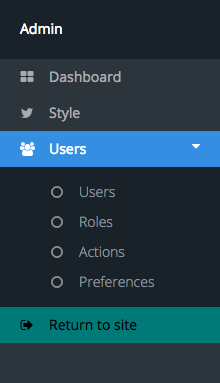
The navigation section should contain an object for each area you will be adding. The above example creates one link in the sidebar: “Users”.
name: The name that will be displayed for the link.
icon: An icon that will appear before the text. (optional)
route: The route the link will point to to load the page.
- children: Any links within this section that should cause this link to still be considered active.
- Generally, this is a combination of any links in the subsections.
- Wildcards are allowed.
SubSection
If SubSection is present, the link will become a drop down. At that point, each object in here will be a link in the drop down.
name: The name that will be displayed for the link.
route: The route the link will point to to load the page.
- children: Any links within this section that should cause this link to still be considered active.
- Wildcards are allowed.
Note
If SubSection is set, the initial link will become text and not link to anything.
Notifications
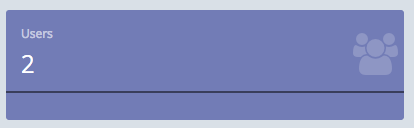
Notifications are used on the admin dashboard. They can display quick, at-a-glance information from the package.
- color: This can be any of the colors allowed by the theme. (teal, blue, aqua, purple, black, orange, red, radiation, green)
- title: The title at the top of the box.
- focus: The primary text that is the most prominent.
- icon: The icon that will appear on the right side of the box.
- size: The number of columns the notification should take up.
- bar: The color of the horizontal bar. (bar or bar-inverse)
Focus
Focus is a unique entry in these. It can be a string, or an object accepting two parameters.
- method: A method to be called.
- argument: Any argument to be passed to that method.
Admin will take these can call call_user_func(<method>, <argument>). Test to make sure your focus works with this call
and it will work as a notification.